How to train a printer operator during commissioning?
The video dated 26 April 2024 discusses operator training during a printer start-up: where setup ends and learning to use the machine begins. It covers the role of practice and cases of equipment faults in production. Click a time to play the video from that point. The video is in Russian.
Questions and answers by the minute
8:52 Does printer commissioning include operator training?
Commissioning means starting the printer, checking it, fixing any faults found and adjusting its settings. The presenter treats training separately: in the case described, the team provides it on their own initiative, rather than as a required part of the work.
9:38 How can a printer operator learn to work independently?
According to the presenter, it takes an interest in the equipment and plenty of practice. If other people resolve every mistake for an employee, they do not draw their own conclusions or learn.
11:25 Should you buy several printers without any operating experience?
Having enough money to buy equipment is not enough: you also need the knowledge to use it. The video suggests learning to use one machine before buying the next, or bringing in an experienced employee.
12:11 How should you organise practical training for a printer operator?
The suggestion is to assign a mentor and work through every setting on the particular machine. The trainee should carry out the tasks and print for themselves. The cost of this training should allow for materials and time.
17:18 Why did ink stop flowing from the printer's tank?
In the case shown, the tube reaching down to the bottom had come loose inside the tank, so ink was no longer being drawn in. The fault was fixed, but by then the printhead, the part that applies ink, had already needed replacing because it had dried out.
18:20 What happens if printer heads are left unparked?
In the video, the heads were left for a week without being parked, meaning moved into their resting position: the heads, pumps and ink lines dried out. After priming, two pumps and the sealing unit beneath the white head needed replacing. It was still uncertain whether that head could be fully restored.
20:30 Can a printer be set up remotely?
The video says technical settings can be adjusted remotely once the printer is assembled, connected to the network and accessible. The printheads must be installed correctly.
21:15 When should you ask the engineer about operating the printer?
The presenter advises against distracting the engineer during assembly and setup. The suggestion is to discuss operating the equipment once the engineer has finished and invites you to an explanation and demonstration.
22:55 What if the printer arrives with a part missing?
In the case described, the engineer gets everything possible running, and the missing part is sent separately. Missing parts or damage in transit may delay the full start-up.
What should you discuss before operator training?
For a photo shop owner, the training discussion can focus on specific questions. This is our list, based on the video.
- Who will be learning to use the machine: the owner, a beginner or an experienced employee?
- Who will explain the settings to the trainee and guide their practice?
- Which tasks will the trainee carry out themselves?
- How will materials and time for practice prints be accounted for?
The presenter expects a trained employee to make fewer mistakes. So when discussing the start-up, it is useful to set out separately how training will be organised.
What should you consider when planning the engineer's visit?
The video links the time needed on site to the amount of equipment, the distance to the customer and the accommodation available for the engineer. These points are worth discussing alongside the list of machines to be commissioned.
Replacing parts damaged in transit is a separate issue: according to the presenter, it may take time. When planning, distinguish between work the engineer can finish on site and work that still requires a part.
How can you choose similar equipment from the catalogue?
The video does not name the exact model. Below is a selection of similar lines and a heat press, a press that transfers an image using heat. Matching the equipment type alone does not confirm that the same model appears in the video.
For comparison, the product pages include the mini with a print width of 30 cm and the T200 + SD400 with a print width of 33 cm. Both lines are listed as having two printheads.
In the video, the installed press is described as having "50 by 60 centimetre" tables and laser guides. The selection includes a press with 50×60 cm tables, but its product page does not confirm that it has these guides.
Equipment in the catalogue
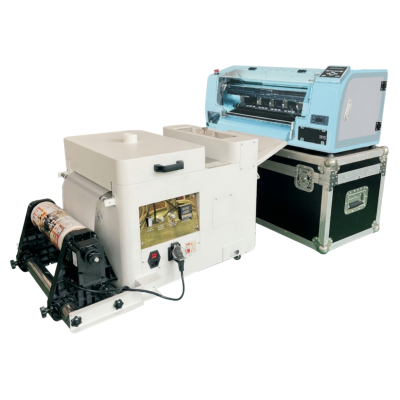 DTF line 30 cm mini, 2 heads
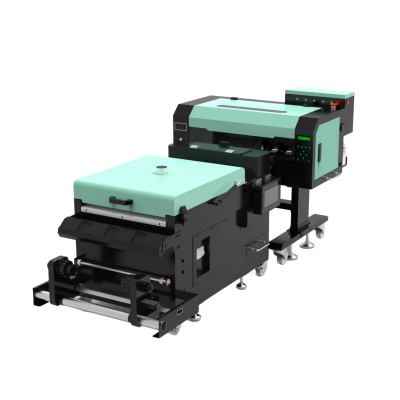 DTF line 33 cm T200 + SD400, 2×i1600
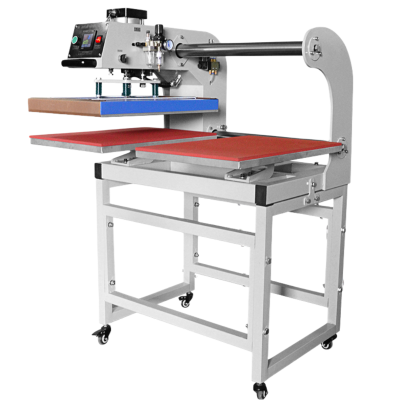 Pneumatic heat press 50×60 cm, 2 tables
