How to automate printing: a cutter and a carousel press?
In the video dated 14 March 2025, the PrintChina team shows equipment at APPPEXPO 2025: from cutting prints to automatically unloading T-shirts. Exhibition demonstrations alternate with walks around Shanghai and a visit to Disneyland. Click a time to play the video from that point. The video is in Russian.
Questions and answers by the minute
1:17 How are objects fed into a conveyor printer?
The machine shown uses a conveyor belt to move objects through the printer. The video points out collision sensors and a scanner; objects are placed in no particular order before the scanner.
2:34 Why does a small DTF printer have a built-in cutter?
The video shows a cutter on a compact DTF printer, which prints on film: printing is stopped and the film is cut without feeding extra film through. It also points out a more convenient roll holder and a white ink filter accessible from outside.
4:08 Can DTF prints be cut directly in the line?
Yes, the video shows a line that cuts prints as they leave the shaker, the unit that processes the film after printing. Instead of being wound onto a roll, the material is fed into holders.
8:15 How does UV-DTF create a raised design on fabric?
In the UV-DTF process shown, which uses ultraviolet printing to produce a transfer, the white underbase gives the design its height. The video mentions two white printheads and one colour printhead. Building up the white layer is slow.
9:09 What does the carousel heat press do automatically?
The carousel heat press in the video, a press that transfers designs using heat, has four tables. Suction cups pick up a print and place it on a T-shirt, and the finished garment goes into a basket or onto a belt. An operator still needs to replenish the prints and lay out the T-shirts.
10:27 What does printing on a bottle with changes in surface height look like?
During the demonstration, the bottle does not rotate quite evenly, but the presenter praises the detail of the design and the varnish. When inspecting the changes in surface height, they do notice slight doubling of the image.
12:24 Why did the bottle print sample turn out uneven?
The bottle had already been used and was covered with white paper for the new demonstration. The paper has bulged and almost touches the printhead. The presenter explains that this sample is only intended to show the machine working.
15:24 How is a custom design printed on a toy figure?
The customer chooses the design and accessories, then a part of the figure is placed in the printer. The machine prints the chosen design, clothing and lettering. After printing one side, the demonstration moves on to the reverse.
Where should you start with automation?
Break the task down into cutting prints, placing the design and removing the finished garment. This makes it easier to choose which manual operation you want the equipment to handle and ask for a demonstration of that specific step.
For T-shirt production, consider the full cycle, including the operator's tasks. The presenter recommends considering the carousel press for those who sell T-shirts and want to automate the process. When choosing equipment, it helps to watch what the operator does between finished garments.
What should you ask to see before buying?
This is our checklist, based on the video.
- Finished print output. Follow the film to the point where the operator collects it. For a line with cutting, ask to see both the cutting itself and how the finished prints are collected.
- The full press cycle. Watch how the supply of prints is replenished, how T-shirts are laid out and where the finished garments go.
- What is included. Check whether the outfeed belt is included. In the video, the presenter only assumes that the conveyor is bought separately.
- A sample with your own design. At the exhibition, the team prints a client's file and plans to take the prints away. You can use this kind of demonstration as the basis for a check before ordering.
How can you compare an exhibition machine with the catalogue?
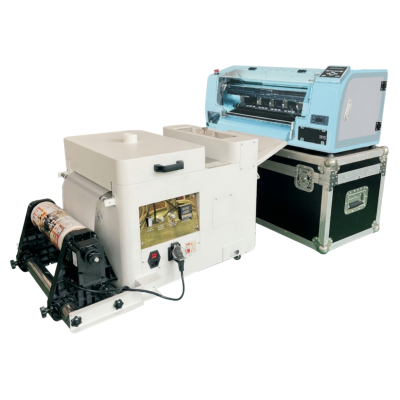
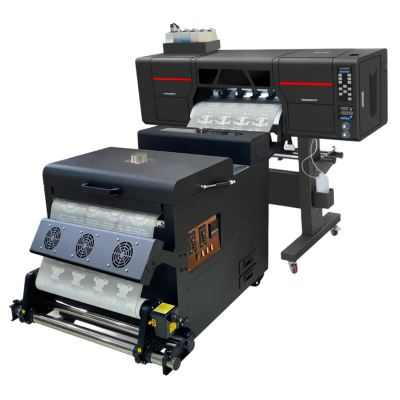
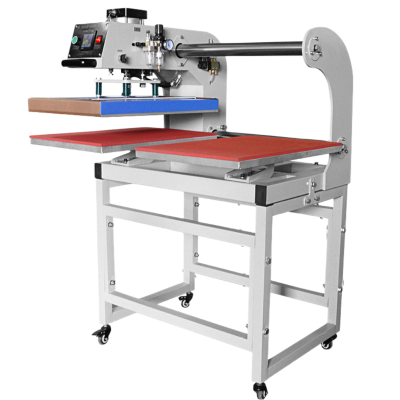
Similar options for printing and transferring designs are listed below. The product pages include a mini DTF line with a 30 cm print width, an ST-602 line with a 60 cm print width and a press with two 40×60 cm tables.
An exact match with the exhibition machines has not been established. The product pages for these lines do not list built-in cutting, and the selected press does not list suction-cup print feeding or automatic garment unloading. These functions need to be checked separately when choosing the configuration.