Why won't a UV and UV-DTF hybrid printer start?
In the video dated 15 September 2024, the PrintChina team looks at the difficulties of starting up a UV and UV-DTF hybrid, a printer that prints on a flatbed and from a roll for stickers. The trip combines a start-up in Biysk with visits to customers in Novosibirsk. Click a time to play the video from that point. The video is in Russian.
Questions and answers by the minute
1:05 Why won't the UV-DTF printer's priming pumps switch on during start-up?
On the printer in the video, the pumps that draw ink through the system would not switch on because of software settings. The team had encountered this fault before and quickly fixed it. The specific settings are not given in this segment.
1:27 Why won't the UV-DTF printer's heads clean properly?
The machine had torn caps, the parts that seal against the heads during cleaning. Air was drawn in through the tears, preventing two heads from being cleaned. Repositioning the caps restored cleaning, but the engineer stressed that the caps still needed replacing.
1:58 Why does the UV-DTF printer lose its USB connection to the computer?
In the video, the cause was a faulty USB cable. The connection either dropped or was detected alternately as USB 2.0 and USB 3.0. The cable needed replacing; this describes one particular case, rather than every possible cause of a lost connection.
2:24 Which printing modes were set up on the UV and UV-DTF hybrid?
First, the printer was set up to print on the flatbed, its flat working surface. Then roll mode was set up for UV-DTF stickers. Both modes of the same machine were checked during this start-up.
2:36 What should the operator learn during a hybrid printer start-up?
The operator is asked to repeat the procedures themselves: switching between flatbed and roll modes, turning on the vacuum that holds the material in place by suction, running a test and performing alignment so that the heads' prints match. Some of the explanations are to be provided on video. Training is given dedicated time and attention.
5:53 How should a print shop prepare for an engineer's visit?
The customers in Novosibirsk had prepared a list of questions in advance. The team noted that the equipment was clean and well maintained. During the visit, they replaced filters and answered the owner's questions.
8:14 How should you prepare a surface before applying a UV-DTF sticker?
The video reminds viewers to degrease the surface before applying the sticker. The sticker is then applied and smoothed down. This segment does not specify a surface preparation product or a waiting time.
What should you discuss with the engineer before start-up?
Discuss faults and the setup of working procedures separately. Alongside fixing the defects found, the video specifically mentions cleaning settings: the timing, frequency and height of ink spraying. It provides no ready-to-use values to copy to another printer.
Our checklist, based on the video:
- Clarify which faults have been fixed and which parts still need replacing.
- Include both required modes in the checks: flatbed printing and making stickers from a roll.
- Set aside time for questions from the operator who will continue working with the machine.
Restoring cleaning and completing repairs should be discussed separately: the cap problem shows why a working printer may still need damaged parts replaced.
How can you prepare an operator to work independently?
Make training a practical part of start-up. Ask the operator to carry out a working procedure with the engineer present and to ask about any unclear steps straight away. This is how training works in the video: explanations are followed by the operator doing the work themselves.
For the next visit, it helps to collect questions in a single list beforehand. This approach is shown at the print shop in Novosibirsk. The list helps move the discussion from general points about the printer to specific difficulties at work.
How can you compare the hybrid shown with the catalogue?
The video mentions three i3200 heads but does not name the model. The machines listed below are therefore similar machines; an exact match with the installed printer has not been confirmed.
The ST-6090Plus product page lists a 60 × 90 cm flatbed and three i1600 / i3200 heads. The IUV-A3UV hybrid is listed as A3 format with one i3200-HD head. Compare the specific configuration, rather than just the word "hybrid" in the name.
A similar ST-602 DTF line with four i3200 heads is included for the print shop visit segment. A DTF line prints images onto film for subsequent transfer to fabric. The model of the line shown in the video has not been identified either.
Equipment in the catalogue
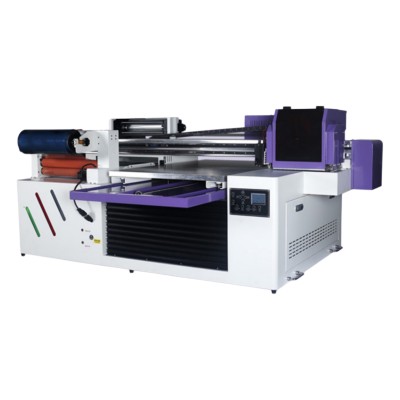 UV DTF printer ST-6090Plus, table 60×90 cm, roll 30 cm
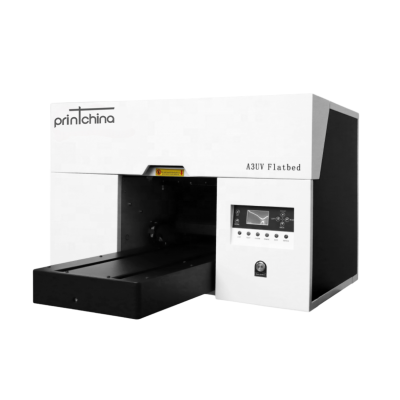 A3 UV printer (IUV-A3UV), i3200-HD, UV and UV DTF hybrid
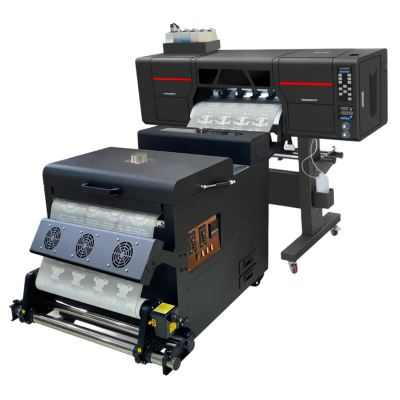 DTF line 60 cm ST-602, 4×i3200
