What should you check when starting a hybrid UV printer?
The video of 10 June 2026 shows the first start-up of a hybrid UV printer, a machine for ultraviolet printing with several operating modes. Commissioning continued into a second day as the engineer worked through the features of the new equipment and demonstrated the results of the setup.
Questions and answers
Can a hybrid UV printer make stickers and print on bottles?
The configuration shown includes UV-DTF, which prints stickers on film from a roll. For bottles, there is a rotary axis that turns the item during printing; an object scanner is described as an optional extra.
Which film rolls fit this hybrid printer?
The video initially gives a 50-metre limit for both films, then clarifies that the limit applies to film A. A 100-metre roll of film A touches the back of the printer body, while a 100-metre roll of film B can be used.
When should you fill the ink during a UV printer's first start-up?
In the video, filling the ink is left until the final stage of the checks. The engineer first checks that the software recognises the printhead and that the machine works, and only then fills the ink.
What is the table size of the hybrid printer in the video?
The video clarifies the table size: 30 by 46, rather than 30 by 40. The engineer also explains that the printhead position can be adjusted despite the fixed supports, and reports that the adjustment is complete.
Why did the hybrid UV printer need a separate driver?
A driver is a software component used to operate the printer. The engineer explains that the angle of the head required a resolution of 692 rather than 720 dots per inch, and PhotoPrint did not have a suitable option. A driver with the required modes was obtained for this start-up.
Can you choose a matt or glossy varnish finish on the hybrid?
The video shows the lamp controls and two small lamps for varnish. The engineer explains that the settings let you choose a matt or glossy result.
How is colour reproduction set up for acrylic on the hybrid printer?
A colour profile is created for acrylic: a set of settings for reproducing colours on the chosen material. The video shows colour patches, areas filled with a single colour, being printed: first to check the maximum amount of ink and then to prepare patches for scanning.
Why does the white layer show around the edges of the image on the tube?
The test uses an uneven tube, and the white layer has not been made smaller than the colour layer. The video recommends shrinking the white by at least two pixels so it does not show around the edges. The printer prints as the head moves in both directions.
How do you switch modes and set up raised printing on the hybrid?
You select bottles, roll or table in the software, and the available settings then load. Passes for white, colour and varnish are set separately: these repeated applications are the method suggested in the video for building a raised image.
What should you confirm about the equipment package before start-up?
Before discussing a purchase, outline the jobs you plan to do: stickers, flat blanks or cylindrical items. This makes it easier to check what is included and arrange a test print. Do not assume that a similar machine has all the capabilities of the one shown.
This is our checklist, based on the video.
- Confirm which attachments are included in your chosen package and which samples will be needed to test them.
- Discuss ease of ink filling with the engineer. The cartridges in the video have small openings, so buying extra syringes or small funnels is suggested.
- Check the tool kit included with your machine. This start-up kit contained lubricant, screwdrivers, hex keys and syringes.
What should you consider when preparing acrylic?
Discuss preparation of the blank alongside colour setup. During this start-up, static electricity had to be removed from the acrylic. A special gun connected to a compressor was used: the air treatment was demonstrated before further work on the colour profile.
For your own test, prepare the material you plan to use for orders. Ask for separate demonstrations of surface preparation and print assessment: this will make it clearer which steps concern the blank and which concern the print settings.
How should you assess the test print?
The tube test during this start-up cannot be treated as a final check of printing on an even bottle. The engineer specifically says that an even item is still needed to adjust image alignment when the head moves in both directions, and the amount the item rotates between passes.
When discussing the result, distinguish between demonstrating capabilities and fine-tuning for a particular blank. Ask the engineer to explain what has already been set up and what still needs to be checked on your material.
Equipment in the catalogue
Below are similar printers for comparison. The video does not name the exact model.
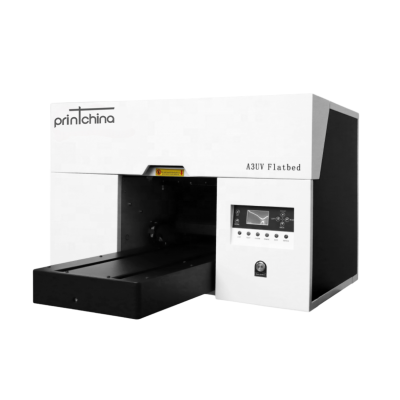 A3 UV printer (IUV-A3UV), i3200-HD, UV and UV DTF hybrid
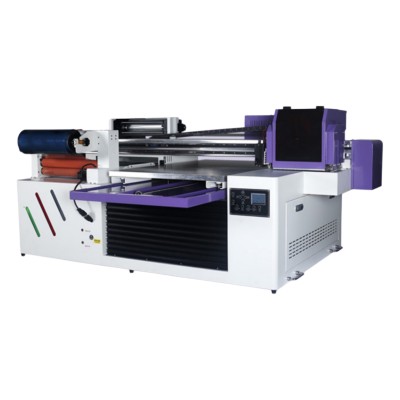 UV DTF printer ST-6090Plus, table 60×90 cm, roll 30 cm
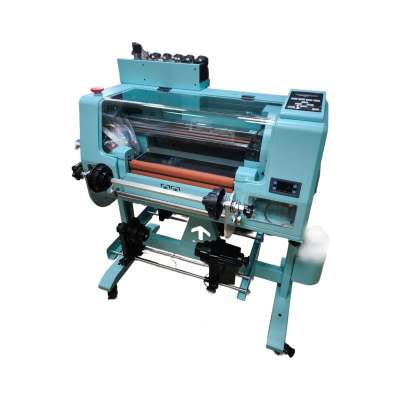 UV DTF printer 30 cm, i3200-HD
