How to choose a hybrid UV and UV-DTF printer in 2026?
In the video of 24 April 2026, PrintChina shows hybrid printers: UV prints directly on objects, while UV-DTF prints on film for stickers. The demonstrations cover object recognition, bottle printing and how the machines are built. Click a time to play the video from that point. The video is in Russian.
Questions and answers by the minute
0:09 How does a hybrid printer locate objects?
A camera recognises objects, and the software determines their position on the table. At the start of the video, this feature is demonstrated on business cards before printing.
0:34 What changed in the controls and table of the new hybrid?
The touch panel was replaced with ordinary buttons, and the roll holders were changed. The table now has tilt adjustments, and a switch selects between roll and table printing. According to the presenter, the settings then need to be changed.
2:23 What improvements were made to the hybrid printer's carriage?
The video points out that this version has heating in the carriage, the moving unit that holds the printheads. There are now screws for adjusting the head positions. However, the presenter still considers the ink tanks too small.
3:14 Why might the white layer shift on a bottle?
Printing starts with a rotary axis, a bottle-rotating holder installed in place of the table. The presenter suggests that liquid moving inside the bottle could be one cause of the slight shift. The advice in the video is to use empty bottles.
5:23 Is a hybrid suitable for printing on a single bottle?
The presenter considers this method more convenient for a batch of identical bottles. First, the holder is adjusted, allowing for some test bottles to be spoiled, and then the print is repeated. In the video, this method is considered less convenient for a single item.
6:16 Will a large hybrid printer fit through a doorway?
For the large hybrid shown, the video gives a doorway width of «one metre forty» to bring it in sideways. Another version that can be removed from its base is also mentioned. These features belong to different machines.
6:48 How does a hybrid print white and colour on a black bottle?
A black bottle is used for the test: a white layer is printed first, with colour on top. After printing, the presenter notices a slight shift of the white layer in fine details. They say the layer alignment needs further adjustment.
8:09 What equipment does the next hybrid in the review have?
The next machine shown has three printheads: for white, colour and varnish. It has a height sensor, an object scanner and water cooling. A separate rotary axis is driven by the movement of the table.
9:16 How is UV-DTF film held in place in a hybrid?
A vacuum holds the film down by suction, preventing it from lifting during printing. This machine also has removable roll holders and tanks with ink level alarms. The presenter notes that stirrers are fitted.
10:11 Can a hybrid detect the size of a blank automatically?
In the test shown, the positioning sensor activates and, according to the presenter, the canvas size is detected automatically. Bubbles are visible on the finished print. The presenter attributes them to the material, but the cause is not checked separately in this segment.
Where should you start when choosing a hybrid?
Decide which jobs you want to try in a test print: flat objects, stickers or bottles. For bottles, specify whether you will print repeat batches or a different item each time. This makes it easier to relate the demonstration to your own work.
Do not assume that one machine has the same capabilities as another. The video of 27 April 2026 (in Russian) shows a limitation of a small hybrid: it cannot print white, colour and varnish on a bottle at the same time.
What should you ask to check during a demonstration?
This is our checklist, based on the video.
- Accuracy in fine details. Ask for a sample with a thin line near the edge: this is how the review checks the position of the print on a business card.
- Switching between jobs. Ask to see the table replaced with the rotary axis and the settings changed for roll printing.
- The printed surface. Examine the raised texture and varnish on your chosen material. If bubbles appear, ask for the cause to be checked on a test print.
- Maintenance access. Check how easily you can reach the parts that need maintenance, which the presenter assesses separately in the review.
What should you check before ordering?
Check the body dimensions and whether it can be removed from its base against your doorway. Then compare the equipment with the machine shown: scanner, rotary axis, printheads and controls.
Below are similar models and a separate sticker printer. The ST-6090Plus product page lists a BetterPrint control board, the electronic unit that controls the printer. For the large hybrid in the video, Hoson is named. A matching table size is not enough to identify them as the same model.
Equipment in the catalogue
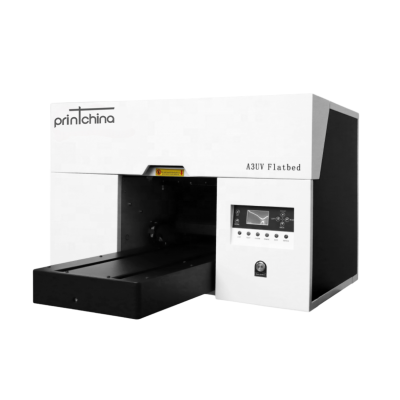 A3 UV printer (IUV-A3UV), i3200-HD, UV and UV DTF hybrid
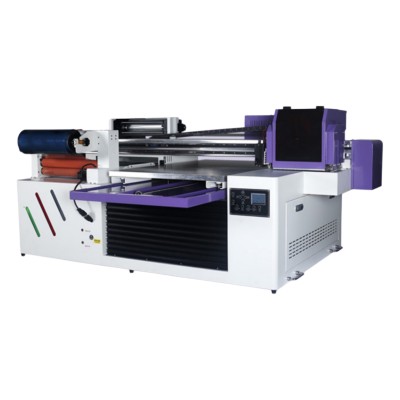 UV DTF printer ST-6090Plus, table 60×90 cm, roll 30 cm
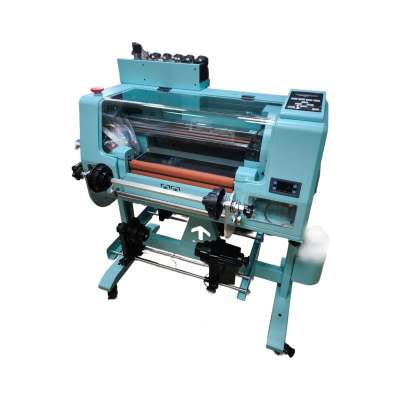 UV DTF printer 30 cm, i3200-HD
